#5 - Right Tool for the Job
The fifth of seven entries in the `Taming the Elephant Heard` series.
Intro
My name is Franco and I’m a systems architect who specializes in mobile systems and particularly Android applications. I recently had the opportunity to work in and subsequently oversee the customer-facing Android application codebase for a large organization. Over this period, and out of equal parts curiosity and need, I had the chance to not only learn, but come to greatly enjoy the wonderful world of Gradle.
This series of blog posts will recant the multi-year, multi-pronged approach I undertook to transform this Android project’s general structure from an afterthought to a self-regulating, hyper-organized monolith. Below is the table of contents for this series:
- From Mayhem to Micro-Managed
- Establishing Existing Order
- Plugins Over Copy-Paste
- Into the Wider Infrastructure
- Right Tool for the Job (this article)
- Screaming and Scripted Architecture
- To Future States and Beyond
Right Tool for the Job
While the organization was catching up to the flexibility provided by the modernized build toolchain, Gradle (and the Android Gradle Plugin and Kotlin Gradle Plugin) were on a relentless march towards an ideal stability derived from Kotlin Multiplatform Mobile, a nascent project created by JetBrains and quickly adopted by Google. Alongside this externally driven project, the Android Gradle Plugin team was hard at work hardening their API boundary layer, eliminating potential dependency on internal details, and providing meaningful quality-of-life improvements to their ecosystem.
The Android Gradle Plugin team introduced an extremely convenient plugin, com.android.settings unifying where key configurations like targetSdk and compileSdk are declared once and auto-applied to any included project (carrying the necessary .library or .application plugins). These simple changes mirror the industry-wide practice of crafting almost identical build convention solutions. Google knew that any firm who produces Android applications eventually creates their own Convention Plugins to handle these repetitive integration requirements. Therefore, Google knew they would save countless hours on plugins yet-to-be-written while simultaneously reducing the required custom code in any existing plugins.
There was a renewed rigor and a refreshingly aggressive roadmap laid out for Gradle, Kotlin, and the Android Gradle Plugin, the latter of which implied frequent updates to Android Studio. Adding more fuel to the fire, Google would soon announce the alignment of Android Studio with the latest IntellJ IDEA, the very product off of which Android Studio is based. Reducing the disparity between these two tools gave developers multiple avenues from which Android development could be approached, simplified IDE Plugin development and maintenance, and helped keep Android Studio stable and up-to-date.
All of these developments led me to re-evaluate the nature of our integration with our build tools. Key APIs consumed by our build code or the external tools with which we were integrating were on the roadmaps for deprecation and removal. The existing infrastructure was now consumed externally to such a degree that changing it was never a considered solution. The writing was on the wall, before long, we would need to rework our build code a bit to meet assumptions of our consumers while adhering to requirements of our own internal dependencies.
Kotlin Multiplatform Mobile/Compose
Focusing on ideal, future-proof solutions, it is impossible not to mention how appealing Kotlin Multiplatform Mobile (or KMM) was as a solution. This Kotlin framework represents a fresh take on the all-too-common desire for mobile apps (or any organization-built consumer of organization-owned back-ends) to share business logic code, like JSON models, request headers, and network certificates. Such a perspective can even alleviate a common issue separate, native codebases can often surface.
Almost every application will, at one point, reach for prepackaged functionality to avoid re-inventing the wheel and take advantage of existing, battle tested, solutions. For such a package to offer parity across multiple platforms is extremely rare, oftentimes including a significant portion of native C code into the mix. Something KMM offers users, combating this reality, is a pathway for support code to easily extend across the same targets KMM compiles to. This gives rise to libraries like Ktor making for a truly shared solution.
In my personal perspective, the KMM approach is the most likely way to successfully achieve “shared (business) code”. From the start, KMM did not try to provide a solution to draw-on-the-screen UI concerns. This focus on business logic allowed the framework to be declared stable for production as soon as 2023, fully supporting iOS, desktop (as a JVM target), and WASM/JavaScript output, making it a very strong choice for almost any project. The Google Drive team pioneered adoption of this framework across a large swath of their public applications, serving as a stamp-of-approval for the tech and an instance where Google put its money where its mouth was.
Not long after reaching production stability, KMM expanded to include a solution for sharing UI widgets, exposing the optional functionality without sacrificing existing infrastructure. Any KMM project was instantly eligible for (and explicitly safe from obligation to adopt) this new toolkit. Even better, the adoption of the UI toolkit was straightforward to eject without affecting the established project.
The core of this new UI framework is none other than Jetpack Compose, Google’s new declarative UI framework for Android. Their union is denoted as Kotlin Multiplatform Compose (or KMC) and is a distinct evolution from KMM. KMC is Kotlin’s answer to React Native or Flutter, whereas KMM is an internal implementation decision (made by a given team) not meant to influence the UI layer directly. End users of an app build from a KMM project would have a hard, if not impossible, time to discern the use of KMM, but KMC (just as with competing “shared UI” efforts) carries the potential to “feel off” when running somewhere to which it was adapted and not necessarily intended.
Even with the head start given to KMC from Jetpack Compose, it was not until May of 2025 that support for UI code on a non-JVM-backed target reached a stable production state. Personally, I look at this development period as a deliberate acknowledgement of how difficult true parity is to achieve across such disjoint platforms. I wonder if this deafening silent period mirrors the same self-reflection needed by those calling for such solutions.
Considering what KMM offered, and how quickly it reached a stable, production-ready state, the sheer power of this tool makes it difficult to not suggest it. Being able to produce JS code from Kotlin code bridges support to web applications as well. There were many times where I went so far as to draw up a potential presentation to the organization at large pitching the global adoption of this powerful paradigm.
These presentations never went beyond my drafts folder though. In the end, it was hard to justify such a drastic approach that didn’t really solve anything on the premise that it could handle anything in the future because eventually every key Android dependency would extend to KMM and support iOS subsequently. KMM was a fantastic utility, but it didn’t always represent the best solution to the tasks at hand. Besides, I did not have success following migration strategies outlined by Jetbrains and could not provide a proof-of-concept where the Android-turned-KMM repository contributed meaningfully to the existing iOS repository.
Overall consensus from the iOS or Android team members, did not support the necessary merging of our repositories. Without merging, efforts to integrate and share code became a two-or-more-step process. On top of this extra developer burden, KMM brings with it a need for iOS developers to be comfortable with Kotlin and Android developers to adopt a slightly more intricate mental abstraction model to avoid direct Android influence in platform neutral/agnostic code.
Doing it by the Demo
Support for new Android Gradle Plugin APIs was provided by the typical documentation pages on developer.android.com and an ever-expanding repository of sample recipes. More often than not, between minor/patch releases, the recipes repository would be updated multiple times over. It was clear that the most effective way to introduce these new APIs were through demonstrations over documentation. These recipes helped projects like mine map existing custom behavior to the replacements offered by the AGP.
Aside from compliance with our toolkit, evolving project requirements, over time, became straightforward to represent. Newly exposed hooks were novel ways to significantly reduce what Android Studio had to do to sync the project and or index find-and-replace results. The most crucial benefit of this second build tool modernization effort was the primary goal of the AGP team. At no point, in any of our customization logic, did internal details of the AGP (like build result directories) matter to us.
The established naming patterns and traceability conventions applied to build artifacts became easier to implement, so much so that the build now renamed all files generated by R8 (mapping, usage, seeds, etc…), creating an identically named ZIP archive of the APK and R8 files bundled together. Normally, creating this ZIP was a manual process (as it wasn’t always necessary), which meant not every record had every file. After this migration, the build generated the ZIP separately from the renamed artifacts, letting the developer get all options with one build.
I grew to appreciate the demo-first approach to these new APIs and wish I had the ability to clone arbitrary repositories at the time I was entrenched in them. During this time is when I engrossed myself in all things related to Gradle. If I consider all my previous experiences as “forming a crush”, it was this integration point where my sentiment became “fell in love”.
Beyond the Build
In a window significantly shorter than my first pass at custom Gradle code, the project was leveraging the proper APIs on the latest AGP version, well positioned to serve in their current form for a long time. At the same time, infrastructure requirements shifted the responsibility of key build steps from Gradle to the recently adopted external tool. The refreshed toolkit provided greater flexibility to “mix-and-match” build steps, even across toolchains.
The funnelling of external tools to plugin-defined, heavily customized, Gradle tasks streamlined a variety of integrations with our build. We were free to make necessary changes through the new AGP APIs without breaking a CI/CD assumption or automated distribution pipeline. Finally, no part of our crucial tools had a hard-coded reference to something under build/outputs/apk and any extra steps we add to the build are optimized (cached and parallelised) by Gradle/AGP for us.
There was a significant effort to document the matrix of tasks with which the developers were expected to demonstrate some mastery. This same matrix also allowed alternative teams an easy ramp-up tool and a crash course on how to use the CI/CD directly. Any time builds were expected to be released (daily QA builds, pre-release regression builds, security audit builds, beta builds, one offs…) and records updated, the build provided all of the necessary information beforehand so developers could prepare announcements without waiting for the build artifact first.
Migrating to the new modernized AGP APIs was more beneficial than expected. I feel like this helped me fall in love with the tech. However, what started as a “nice-to-have” turned into a “killer feature” of the entire migration, our migration from buildSrc to a collection of Composite Builds, strictly optimizing Application Binary Interface size.
Composition over Inheritance
Gradle’s Composite Builds feature was now stable and the Gradle team encouraged replacing buildSrc with Composite Builds. Changes to buildSrc invalidated all caches, regardless if the change was internal. A Composite Build benefits from the separation of interface/implementation artifacts. Likewise, something internal to a Composite Build is entirely opaque to consumers, avoiding unnecessary invalidations. More recent versions of Gradle have taken significant strides so buildSrc behaves more like the Composite Build it actually represents (under the hood), reducing any pressure/need to refactor buildSrc. However, this is now and back then, swapping buildSrc for Composite Builds was a “Top 5” way to speed up Gradle performance in larger projects. The challenge was accepted.
Migrating to Composite Builds allowed me to practice writing “consumed” code with the added benefit of faster Gradle sync performance. To keep the changes opaque to the project root, the Composite Builds were housed under the gradle directory, next to the eponymous wrapper directory, and our collection of Version Catalogs. The first Composite Build exclusively housed universally referenced definitions like enums and arbitrary interfaces. Everything in this Composite Build was public and no implementation existed, there was nothing marked as internal.
The second Composite Build contained custom Gradle and AGP objects (like Tasks). These definitions were even further organized across .api definitions and .impl implementations. Consumable definitions are only .api packaged entities and anything within .impl is paired with the internal modifier. The third Composite Build mirrored the .api/.impl separation and contained the migrated Convention Plugins. Our dependency graph contained a single integration point with our custom code keeping the IDE responsive across all but the most intense Gradle edits.
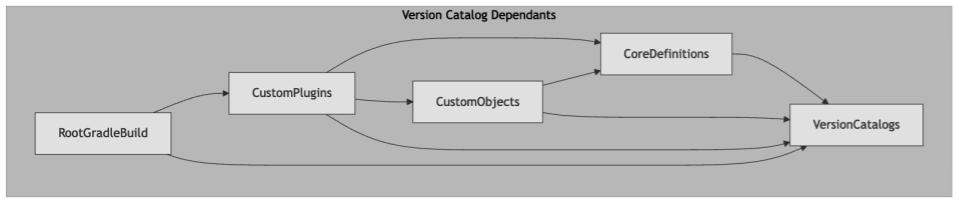
As an added bonus, the existing Version Catalogs were consumable by every Composite Build. Considering, the Version Catalogs themselves had no dependency elsewhere, we were able to embed the names and versions of our internal tools within our, other, internal tools. It was impossible to introduce circular dependencies as well.
Due to the well defined boundary between these Composite Builds and the repository code, this collection served multiple purposes. Integrating documentation generator Dokka across these projects as a testbed influenced subsequent applications to shared code modules, ensuring genuinely helpful output. Soon, we were able to combine our scattered README.md files with generated output to provide new team members a thorough introduction to the codebase.
With the repository re-aligned with best practices according to Android Gradle Plugin and Gradle, we were now equipped with a flexible, approachable, and easily maintained build tool. Long gone were the days of nondeterministic behaviors and there wasn’t a deprecation warning in sight. For the first time, in a long time, the Android project was one of the more highly praised facets of the entire department. As discussed in the next post, the project is now so predictable that most future enhancements come in the form of bash scripts and simple automations rather than changes to Gradle.